The Problem
The CEO of Saiko Builders, a construction company I build for, reviewed the live site on her phone and sent me ten changes. Nine were about photos: 95 new images for six project pages, a new card image for one project and a new hero image for another. The tenth needed a code change.
Done by hand, that is hundreds of clicks in the WordPress admin: upload, paste the alt text, open the project, find the right gallery, drop each image in the right place. Every click is a chance to put a photo in the wrong slot or skip its alt text. And this is a live site that people look at while deciding whether to trust the company with their house.
So the question I started with was not how to go faster. It was how to change a lot on a live site in one day and know, not hope, that nothing broke.
The Fix
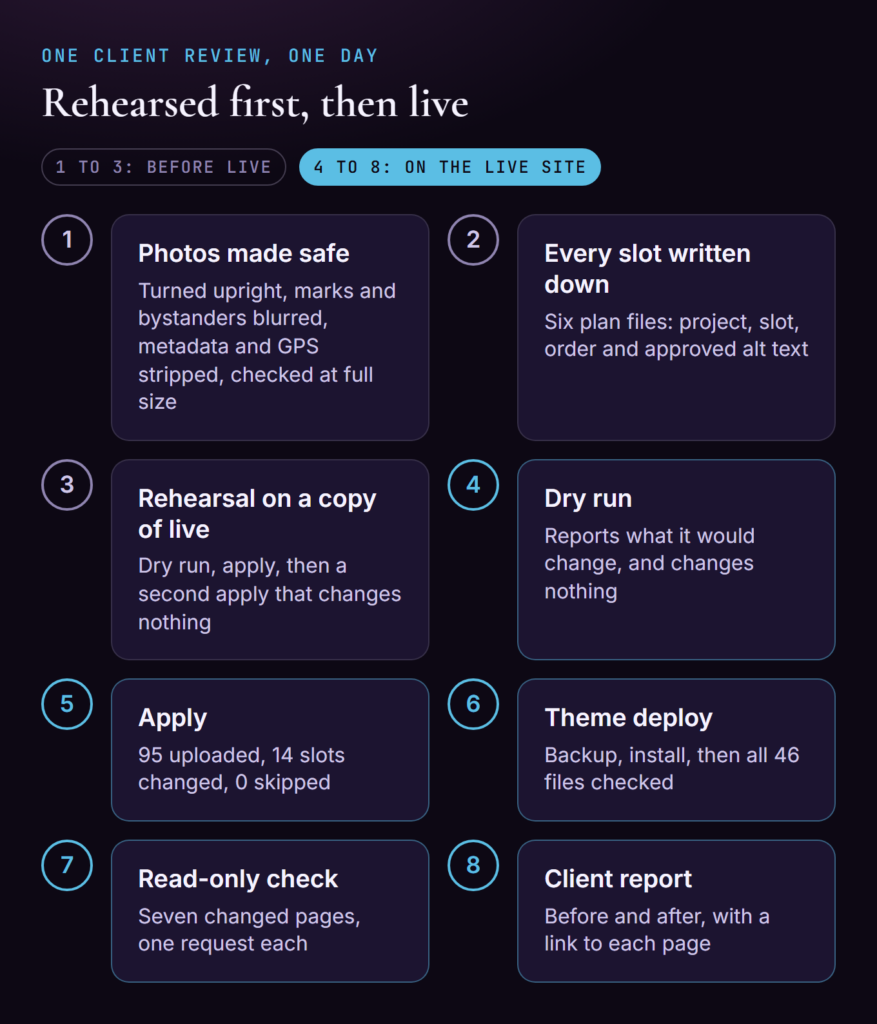
The answer was the same order every time: make it safe, write it down, rehearse it, run it for real, check it, report it. “One pass” in the title means one rehearsed session on one day, not one magic command.
Make the Photos Safe First
Before a photo goes anywhere near the site, it goes through my processing script. It turns each photo the right way up, blurs other companies’ brand marks and any bystanders, strips all metadata including GPS, and never makes an image bigger than its source. GPS matters more than most people expect: a photo of a house can carry the house’s exact location.
Then I check the output. My first check used scaled-down previews, and everything looked fine. It was not. When I checked again at full size, cutting 213 close-up tiles from 55 output files, I found 24 blurs sitting beside their target instead of on it. A small preview hides that. All 24 were corrected, and checking at full size is now a fixed rule in how I work.
Write Every Slot Down
Every image went into a plan before anything was uploaded: six CSV files, one row per image, saying which project, which slot (hero, card or gallery), what order and what alt text. Every new image had its alt text written and approved before upload.
If it is not written down, it cannot be checked. The plan is also the file the importer reads, so the record and the action are the same thing.
Rehearse on a Copy of Live
I loaded that day’s live database export into a local test site and ran the whole round there first. For each plan: a dry run, which reports what it would do without changing anything; an apply; then a second apply, which should change nothing at all. If a second apply changes something, the plan or the tool has a problem, and I would much rather find that on a copy.
Then I compared the test site with an untouched copy of the export: 95 new images, 14 fields changed, nothing removed and no existing alt text touched. That was the result I expected to see on live. Afterwards I restored the test database, so the next test starts clean.
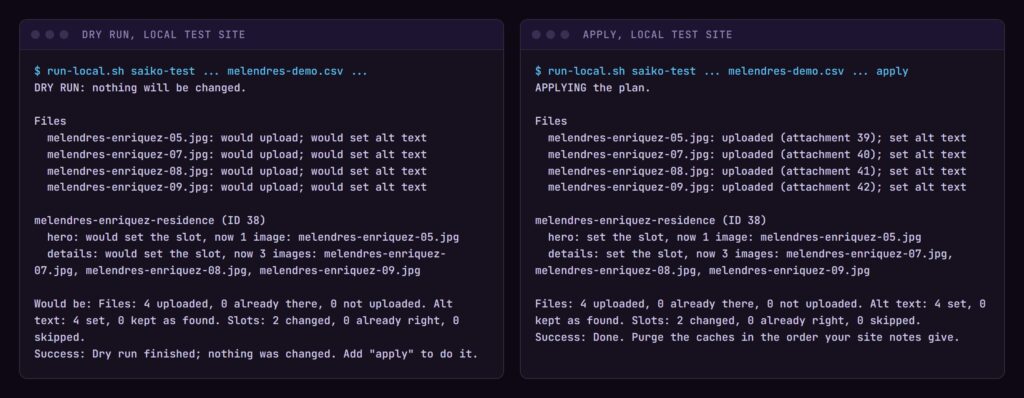
I did not save the terminal output from that day, so the picture above is a rerun on my test site, with a small plan for a stand-in copy of one project. It shows the same thing: the dry run on the left reports, and the apply on the right does exactly what the dry run said.
Live: A Dry Run, Then an Apply
On the live site the order was the same: a dry run for each plan, read it, then the apply. That made twelve runs for six plans, and every one matched the rehearsal number for number: 95 uploaded, 14 slots changed, 0 skipped. Then the page caches were cleared.
A live dry run still matters after a rehearsal, because the live site may have changed since the export. If the dry run disagrees with the rehearsal, I stop and find out why before applying anything.
The Tenth Change Needed Code
The tenth change was not a photo. On phones and tablets, a gallery with an odd number of images left an empty cell at the end of its grid, and after this round many galleries held an odd number. The fix became a theme release, version 0.6.12, shipped the same day.
Theme releases go through my deploy tool. It backs up the theme already on the server, installs the new release, then checks every file on the server against the release. For 0.6.12 that was all 46 files, five of them changed. If any file had not matched, I would have known straight away, with the backup ready to put back.
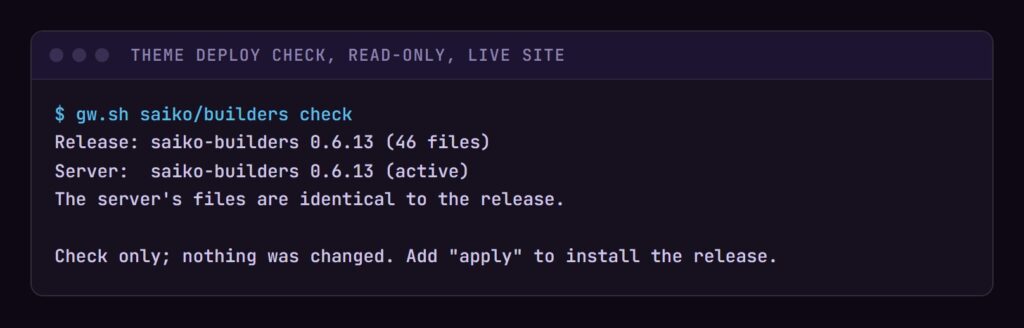
The same tool can run that check on its own, without installing anything. This one I ran while writing this post, by which time a later release, 0.6.13, was live: all 46 files on the server still match it.
The Result
Once everything was live, I checked the seven changed pages with one request each, without touching anything. Every gallery matched its plan, in order, and every new image printed the alt text approved for it.
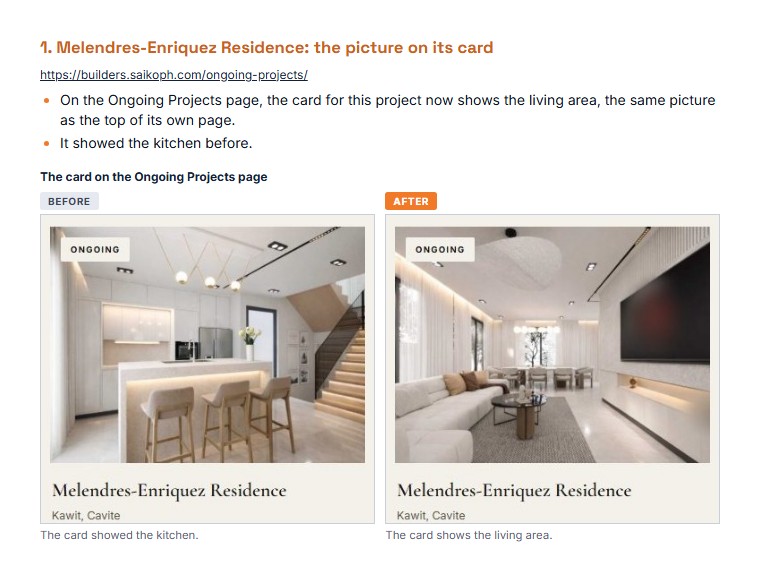
The client got a short report the same day: every change listed, a link to each page, and a before and after picture of each. The “before” pictures have to be taken before anything changes, so taking them is part of the round, not an afterthought. Here is one change from that report, the Melendres-Enriquez Residence card:
What I Would Tell Someone Else
Three habits did most of the work here:
- Rehearse on a copy of live. Real data catches what a made-up test site never will. On this round, the export corrected two of my plans before they ever reached live.
- Dry run first, every time. It is cheap, and it turns a live change into something you have already read.
- Check blurs at full size. A scaled-down preview told me 24 blurs were fine when they were not.
If your site needs a lot changed without the risk, tell me the problem, and we’ll work out the fix together.